https://www.bilibili.com/video/BV1Tw4m1Q7qG/?spm_id_from=333.337.search-card.all.click&vd_source=ffda878df0ed45bee1ade91d8f451048 https://www.bilibili.com/video/BV1Zi4y1T78H?spm_id_from=333.788.player.switch&vd_source=ffda878df0ed45bee1ade91d8f451048
1
2
3
4
5
6
7
8
9
10
11
12
13
14
15
16
17
18
19
20
21
22
23
24
25
26
27
28
29
30
31
32
33
34
35
36
37
38
39
40
41
42
43
44
45
46
47
48
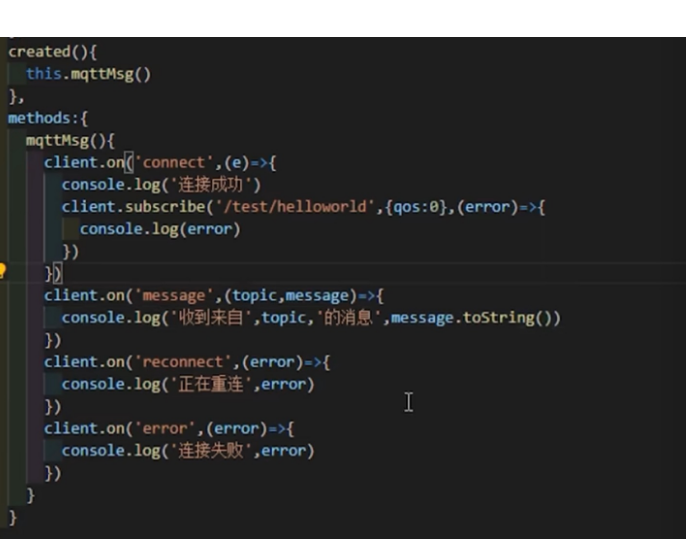
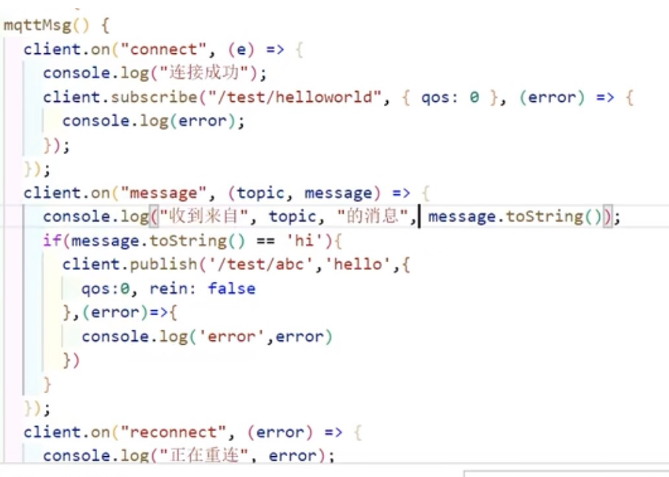
import mqtt from 'mqtt'; export default { name: 'MqttComponent', data() { return { client: null, }; }, created() { this.connectMqtt(); }, methods: { connectMqtt() { // 假设你的 MQTT 服务器支持 WebSocket,并且地址是 ws://your.mqtt.broker this.client = mqtt.connect('ws://your.mqtt.broker', { clientId: 'unique_client_id', }); this.client.on('connect', () => { console.log('MQTT Connected'); // 订阅主题 this.client.subscribe('your/topic'); }); this.client.on('message', (topic, message) => { // 处理接收到的消息 console.log(`Received message on ${topic}: ${message}`); }); this.client.on('error', (error) => { console.log('MQTT Error:', error); }); }, publishMessage(topic, message) { // 发布消息 this.client.publish(topic, message); } }, beforeDestroy() { if (this.client) { this.client.end(); } }, };
疑问:
1
2
3
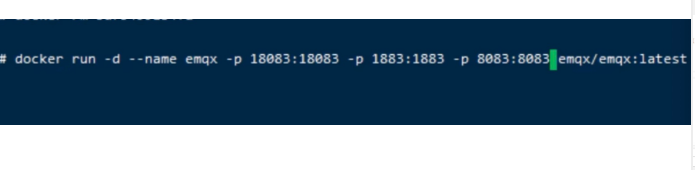
[admin@cdn116 ~]$ sudo docker run -d --name emqx -p 2883:2883 -p 8083:8083 -p 8084:8084 -p 8883:8883 -p 18083:18083 emqx/emqx
http://192.168.40.116:18083/#/dashboard/overview
vue mqtt demo
1
2
3
4
5
6
7
8
9
10
11
12
13
14
15
16
17
18
19
20
21
22
23
24
25
26
27
28
29
30
31
32
33
34
35
36
37
38
39
40
41
42
43
44
45
46
47
48
49
50
51
52
53
54
55
56
57
58
59
60
61
62
63
64
65
66
67
68
69
70
71
72
73
74
75
76
77
78
79
80
81
82
83
84
<template> <div>{{msg}}</div> <button @click="stop">stop</button> <button @click="start">start</button> </template> <script> import mqtt from 'mqtt' import { ref, onUnmounted } from 'vue'; const options = { port: 8083, connectTimeout: 4000, clientId: 'mqttjs_' + Math.random().toString(16).substr(2, 8), reconnectPeriod: 5000 // 自动重连时间间隔 }; let client = null; export default { name: "App", setup() { const msg = ref('hello world'); const start = () => { if (!client || client.connected === false) { client = mqtt.connect('ws://192.168.40.116/mqtt', options); setupClientEvents(); } }; const stop = () => { if (client && client.connected === true) { client.end(function() { console.log('disconnected'); }); } }; function setupClientEvents() { client.on('connect', function () { console.log('Connected to MQTT broker'); for (var i = 1; i <= 10; i++) { client.subscribe(`stock/${i}/price`, function (err) { if (err) { console.error('Subscription error:', err); } }); } }); client.on('error', function (err) { console.error('Connection error:', err); }); client.on('message', function (topic, message) { console.log(topic + ':' + message.toString()); msg.value = JSON.parse(message.toString()).msg; }); } onUnmounted(() => { if (client) { client.end(); } }); return { start, stop, msg }; } }; </script>
yum search mosquitto
yum install mosquitto.x86_64
mosquitto_pub
命令就可以执行了
参考文档
https://xw1ei7mxto.feishu.cn/wiki/Wdn2wOBfvis1Hhk6rYccNrvHnYd
开启 mosquitto
发布消息
mosquitto_pub -h 127.0.0.1 -p 1885 -t topic1 -m ‘{“key1”:”value1”,”key2”:”value2”}’
订阅消息
参考文档:
发布消息
mosquitto_pub -h 192.168.40.116 -p 1883 -t topic1 -m ‘{“key1”:”value1”,”key2”:”value2”}’
订阅消息
cnpm install mqtt -g
mqtt pub -h 192.168.40.116 -p 1883 -t topic1 -m ‘{“key1”:”value1”,”key2”:”value2”}’
mqtt pub -h 192.168.40.116 -p 8083 -t topic1 -m ‘{“key1”:”value1”,”key2”:”value2”}’